AI Tool: Google Flow
Infographic
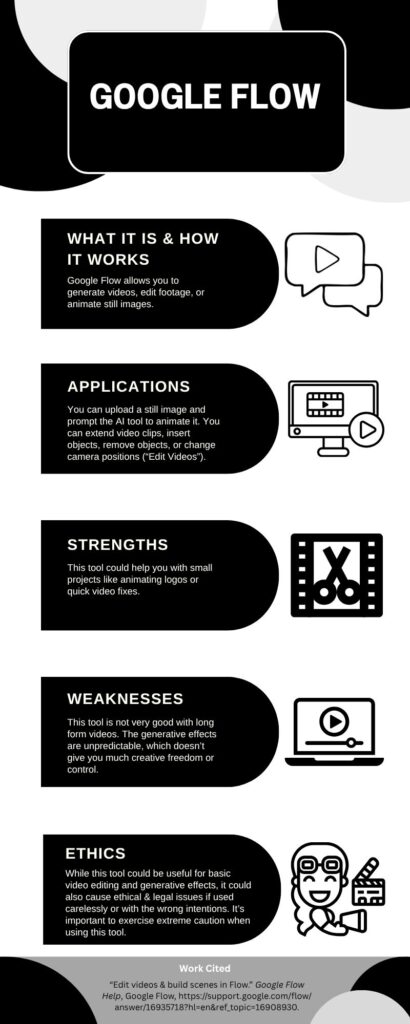
I made this infographic with Canva.
Artifact & Description
Artifact
For this project, I decided to animate a Photoshop collage I created for my graphic design class last year. I uploaded the image to Google Flow and entered the prompt: “Animate the people in this image so they appear to be dancing and talking with each other.” This video shows my process:
Google Flow generated two clips that I could choose from. This video shows the results:
Neither of these videos incorporated my uploaded image. These videos did align with my prompt though! I decided to try again with a different process. I inserted my original graphic into the start and end slots, and then I added the prompt: “Animate the people in this image to dance and talk with each other.”
The following video depicts the prompt results:
These results actually used my original image and created interesting (and quite entertaining) animated scenes! Neither of these animations are perfect, but I appreciate the attempts.
Description
I choose to analyze Google Flow, an AI tool used to animate and generate videos. First, I uploaded my Photoshop image to Google flow. Then, I typed out a prompt to animate the characters in my image. Instead of giving me what I envisioned, the tool provided me with two AI generated clips of people from different cultures at a dance party. For my next attempt, I uploaded the image to the start and end slots and typed out specifically what I wanted the tool to do with my image. The resulting videos did incorporate my image this time, and the resulting animations and sound effects caused me to laugh. While the videos are closer to what I had imagined, they are full of imperfections. Unfortunately, I ran out of AI credits, so I couldn’t adjust for the errors.
Here is the citations for the first Google Flow prompt:
“Animate the people in this image so they appear to be dancing and talking with each other” prompt. Google Flow, Open AI, 31 Mar. 2026. https://labs.google/fx/tools/flow.
Here is the citation for the second Google Flow prompt:
“Animate the people in this image to dance and talk with each other” prompt. Google Flow, Open AI, 31 Mar. 2026. https://labs.google/fx/tools/flow.
Reflection/Analysis
By using Google Flow, I was able to turn my Photoshop graphic into two short animated clips. This allowed me to switch from one medium (a still image) to another (video) in just a few simple steps. While this process could be useful, I didn’t have as much creative control as I would’ve liked. The limited amount of free AI credits also prevented me from prompting more alterations, which added to my lack of control. The sound effects were also randomly generated, although I could have controlled them more if I had made the prompt more specific.
Let’s examine Google Flow within the framework of the Wesleyan Quadrilateral (scripture, tradition, reason, and experience) to determine how we can use it ethically.
Scripture: While the Bible doesn’t say anything directly about turning a picture into an AI generated video, it does caution us about keeping our eyes and our minds fixed on pure and Godly things. (See Matthew 5:28-29, Matthew 6:22, and Philippians 4:8). While this AI tool can be used to produce innocent videos, the same tool can be used for evil purposes. In addition, since we don’t actually have control of the end product, we must be very careful and specific in the way we word our prompts so we don’t accidentally create something contrary to God’s holy standards.
Tradition: While the use of Google flow is an alternative to how videos are traditionally animated, I don’t believe it replaces human animation and video production. The videos generated by Google flow have several uncontrollable errors that a well produced human-made animation or video would not have. In addition, the Bible mentions the concept of God-given creativity in Exodus 31:4. Surely man-made projects have more quality and value than AI generated clips.
Reason: Reason also shows us that people skilled in animation and videography are more reliable than generative AI bots. Humans can rationally think through an idea from start to finish and think about how it might be perceived by others, while AI tools can only generate items based on its data sets and promptings.
Experience: My own experience with Google Flow shows me that no matter how specific I make a prompt, I’m ultimately at the mercy of the generative AI tool and the specific wording of the prompt. Even if I word everything carefully, I can still get undesirable results. As someone experienced in video production, I understand that tools like Google Flow can be helpful in areas like animating a logos or generating stock footage. However, I also know that the work I produce on my own is much more reliable than anything AI could produce for me.
AI Usage
I used Google’s AI Overview to help me find Bible verses pertaining to the scripture and tradition sections. I looked up the actual verses to make sure they were accurate. Here are my citations:
“Bible verses about being careful what you see” prompt. Gemini, Open AI, 31 Mar. 2026.
“Bible verses about the value of creativity in the human mind” prompt. Gemini, Open AI, 31 Mar. 2026.